
6 Things I'm Doing with Codex and Claude Code Right Now to Save 30+ Hours a Week
What I'm using them for and the specific setups behind each one

Unfortunately, I had to miss last week’s edition but I thought this would be a great piece to share to help you guys get inspired on what to start building.
Last time, I wrote about Codex — what it is, how it compares to Claude Code, and the few features that actually matter past the marketing. But the golden question is:
“Okay, but what are you doing with it?”
That’s this issue, six specific things I’m running with Codex and Claude Code right now.
Fair warning: some of these are going to sound like they require a developer background. They don’t. The reason I’m documenting all of this is because I built most of these workflows in plain language, through conversation, without writing a single function.
Let’s get into it.
Running 4–6 parallel agent sessions instead of one
The first thing that changed how I think about these tools wasn’t a feature. It was a workflow pattern I picked up from Boris Cherny, the engineer who built Claude Code.
A few months ago, he admitted to X that he runs five or more parallel Claude sessions simultaneously, each in its own separate git checkout. Each session starts in plan mode. He iterates on the plan, then switches to auto-accept once it’s good.


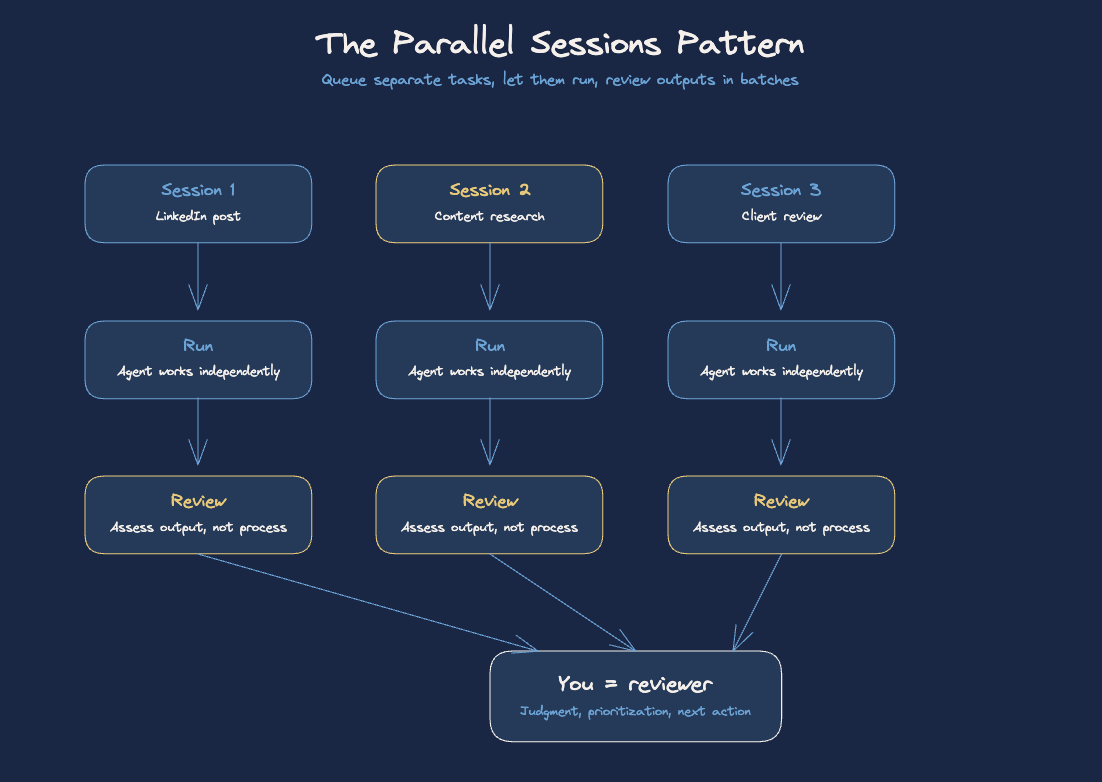
I run a version of this with my content and operations work. Right now, while one Claude session is scripting a LinkedIn post, another is doing research for next week’s content, and a third is reviewing a deliverable for a client. The key here is that they are independently scoped tasks that I can come back to and review in batches.
This is where most people get it wrong. They think the productivity gain from Claude Code or Codex is “it does the thing faster.” That’s the surface layer. The actual gain is that you stop thinking about one thing at a time. You become a reviewer, not a doer. Your job shifts to output assessment, not production.
The practical setup is simpler than it sounds: open multiple terminal windows (or Codex tabs), give each one a clearly scoped task with a defined output, and let them run. Check back when the session indicates it’s done or hits a decision point.
CLAUDE.md as the onboarding doc for every agent
This one is less flashy but it’s changed the reliability of every single workflow I run.
CLAUDE.md is a markdown file that lives in your project root and tells Claude — at the start of every session — exactly how to behave in this context. Your rules, your tools, your preferred patterns, your constraints. Think of it as the onboarding doc you’d hand a new employee on day one.
The community consensus in 2026 is: keep it under 200 lines. Use a WHAT/WHY/HOW structure for every instruction, not just “do X,” but “do X because Y, here’s what that looks like.” And commit it to the repo, so every session (and every team member) starts from the same baseline.
The mistake most people make is that CLAUDE.md grows into a procedures document and balloons to 1,000 lines. At that size, Claude is reading a wall of text at the start of every session and context overhead eats your budget before you’ve done anything useful. The discipline is keeping it tight, specific, and regularly pruned.
What I have in mine for the content agent, as an example: the content pillars (so Claude knows what angles to research vs. ignore), the Notion database IDs (so it knows where to write without me specifying every time), the voice rules (conversational, no bullet-only posts, sentence variation), and a short list of things it should never do without checking first (publish anything, move items to Done without a draft, push to Drive without confirming the folder).
That last part matters. CLAUDE.md is advisory, Claude can technically ignore it in a long session if it gets distracted. Which brings me to hooks.
A hook is a deterministic callback in your settings.json.
The mental model: CLAUDE.md is your culture doc. Hooks are your compliance system. You need both. Culture without compliance breaks in high-pressure sessions. Compliance without culture produces robotic, misaligned output.
If you’re running any production Claude Code workflow and you don’t have both in place, you’re running on trust alone.
Skills for everything that repeats
If there’s one pattern I wish I had internalized earlier, it’s this: if you explain the same workflow to Claude more than twice, it should be a skill.
A skill is a markdown file in your .claude/skills/ directory. It’s not executable code. It’s structured instructions — “here is the process, here are the inputs, here is what good output looks like.” Claude loads it when you call it, follows the process, and produces a consistent result. Every time.
The difference between prompting Claude and running a skill is the difference between telling a new employee how to do something each time and writing it into an SOP. The SOP takes longer to write once, then it (hopefully) runs without you.
The other thing skills do: they make your setup transferable. If a collaborator joins your project, they don’t need to learn your quirks. They call the skill. It runs. The output is consistent because the instructions are consistent.
The skills I get the most leverage from: content research, video scripting, infographic generation, Gmail triage, and a financial check-in that summarizes my spending against budget. Each one started as a workflow I was doing manually and complained about at least twice.
If you have a workflow you’ve explained to Claude more than once this week, that’s your first skill candidate.
Codex for the batch work I used to put off
This is where the Codex vs. Claude Code routing logic actually matters.
The short version: I use Claude Code for anything interactive, complex, or context-heavy. I use Codex for well-defined batch work I can hand off and review later.
The practical distinction comes down to execution model. Claude Code runs in your terminal, reads your actual repo, and works iteratively with you in the session. It’s the right tool when you need to make judgment calls mid-task, when the scope is ambiguous, or when the task requires your context to resolve. Codex runs in a cloud sandbox, reads a snapshot of your repo, works autonomously, and returns a diff for your review. It’s the right tool when you can write a clear spec with acceptance criteria and don’t need to be there while it runs.
In my content operation, Codex handles the tasks that have a clear definition of done but that I kept procrastinating on because they were tedious, not because they were hard. Updating test coverage in a utility script. Refactoring a data formatter that was getting messy. Renaming a batch of files consistently.
None of those tasks required my judgment. They just required someone with the context and patience to execute them cleanly.
The thing I’ve had to fight is the instinct to use Claude Code for everything because I trust it more. That instinct leads to slower execution. Codex running three well-scoped tasks overnight is faster than me queuing those same tasks through Claude Code one at a time over two days.
The routing question I now ask for every task: “Do I need to make decisions while this runs, or do I just need to see the result?” Decision-making during = Claude Code. Result review only = Codex.
Computer use for workflows that don’t have APIs
This is the one most people haven’t tried yet and should.
Codex can control your screen directly. It moves your mouse, opens apps, clicks buttons, types into fields, reads what’s on screen, and makes decisions based on what it sees. If you can do it on your computer, Codex can do it.
The old rule for automation was: you can automate anything that has an API or an MCP integration someone built. Anything behind a login with no API was manual work. Computer use breaks that rule.
The business use cases that come up most for founders and operators: automating outreach through platforms that don’t expose clean APIs, filling repetitive forms in legacy enterprise software, managing ad campaign settings across platforms that have functional but tedious interfaces, and navigating government portals that are almost entirely manual by design.
To set this up, you just need to invoke it directly in Codex, and give the appropriate permissions on your computer.
Computer use still needs supervision on the first few runs. It’s not a set-and-forget capability yet — it’s more like training a new hire on a repetitive task. You watch them do it twice, correct anything that’s off, and then trust the pattern.
If you have any workflow that’s purely click-through manual work in a tool without an API, that’s your candidate.
Scheduled agents running while I sleep
This is the one that changed my morning most.
Claude Code has a routines/scheduling layer — cloud-hosted, persistent, not dependent on your machine being on. You write the task in plain language: “Every morning at 6am, pull recent posts from this list of X accounts, filter for anything about AI agent workflows, and drop a summary into this Notion page.” That’s the entire setup. It runs. You wake up to the output.
What I have running on a schedule right now:
An X scanner that pulls posts from about 35 AI creators and news accounts I track, filters for the substantive takes versus the announcement reposts, and formats a digest. It’s been running for two months. I haven’t scrolled X for research since.
A content research job that runs Tavily searches across my content pillars each week, surfaces what’s trending, and stages it in Notion at the Researched status so it’s ready for scripting.
A Gmail triage that reads my inbox before I open it, categorizes threads by action required, and surfaces the two or three things that actually need a decision.
None of these replace me. They replace the 45 minutes of tab-switching I was doing each morning to get to the point where I could actually start working. The scheduled agents do the production step. I do the review step. That’s the whole system.
The piece most people miss about scheduled agents: you still need to review the output regularly. Not because the agent will go rogue — it won’t — but because the world changes. A source stops being useful. A search query needs to be updated. A workflow breaks because an upstream tool changed its structure. The maintenance overhead is low, but it’s not zero.
The setup cadence I’d recommend: build the routine, run it manually three times to validate the output, then set it on schedule. Once a month, spend 20 minutes reviewing whether the outputs are still useful. Prune, update, replace as needed.
The frame that helped me: scheduled agents are infrastructure, not magic. You maintain infrastructure. You don’t ignore it.
The Routing Map
Here’s the routing logic I use across all six of these, pulled into one place:
CLAUDE.md + hooks: Set this up once, per project. It’s the foundation everything else runs on.
Skills: Build these whenever a workflow repeats. They’re the library your agents pull from.
Parallel sessions: Use when you have multiple independent tasks. Queue them in the morning, review in the afternoon.
Claude Code (interactive): Complex reasoning, ambiguous scope, anything requiring your judgment mid-task.
Codex (async): Well-scoped, clearly defined tasks you can specify upfront and review on delivery.
Computer use: Any workflow that’s purely manual click-through in a tool without an API.
Scheduled agents: Anything recurring with a predictable output that doesn’t require your real-time judgment.
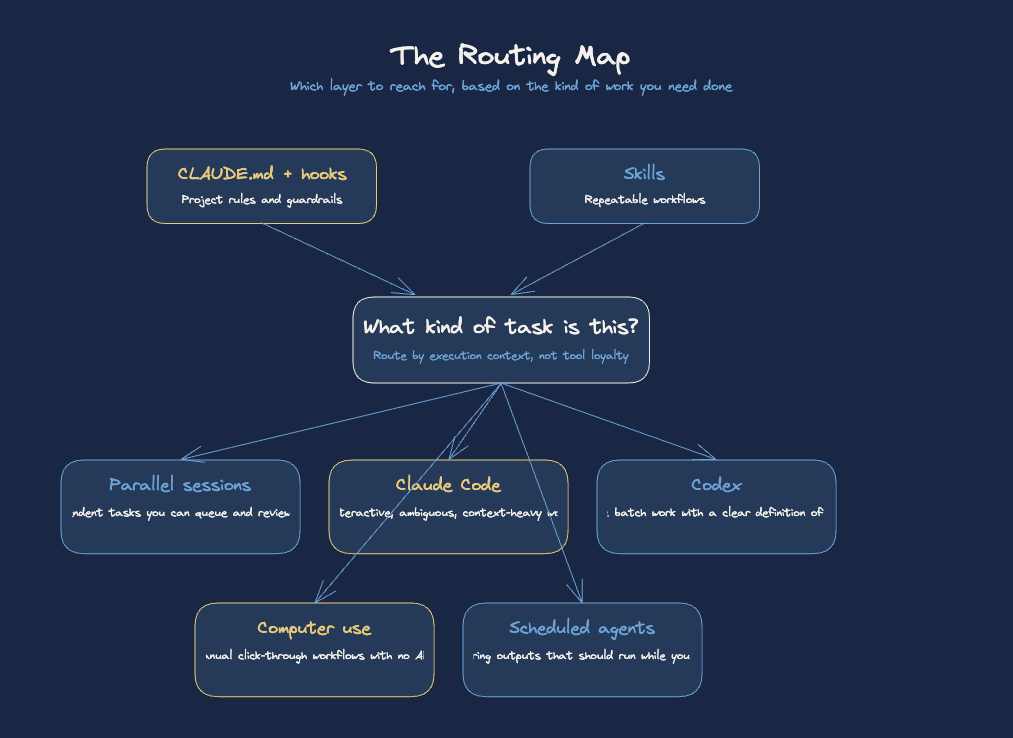
The point of sharing all of this is not to say “your setup should look like mine.” It’s to show that the underlying pattern — a few primitives, layered deliberately, routing work to the right execution context — produces a system that operates beyond what one person should be able to run.